

Customer success QBR template for a complete account review
The Customer Success QBR PowerPoint Template helps customer success managers run a quarterly conversation about agreed goals, product adoption and the next success plan. The kit pairs a complete 16-slide fictional account review with a matching 16-slide working template and a two-sheet Excel preparation and follow-up tool. The deck includes native chart data and tables, with speaker notes explaining definitions, checks and limitations.
What you receive
- Two 16-slide PowerPoint files in widescreen 16:9: the complete fictional example and a matching working template with bracketed fields.
- Two native charts per deck for adoption and median approval time, with embedded editable data. The working charts contain clearly labeled zero placeholders that must be replaced through Edit Data.
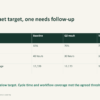
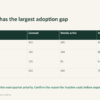
- Nine native tables per deck for account context, goals, team coverage, support, rollout, stakeholders, actions, renewal dates and definitions.
- Speaker notes on every slide, a README, an input-and-follow-up guide with worked values, and a single-business license.
- A two-sheet Excel tool: Metrics calculates weighted adoption, target gaps, changes in approval medians, support reconciliation and workflow coverage; Success plan tracks 20 actions or pending decisions with owners, due dates, acceptance evidence and completion dates.
Version 1.1: the working template and preparation workbook are included in the same ZIP. The files use manual data transfer. Excel does not automatically populate the PowerPoint slides.
The customer review structure
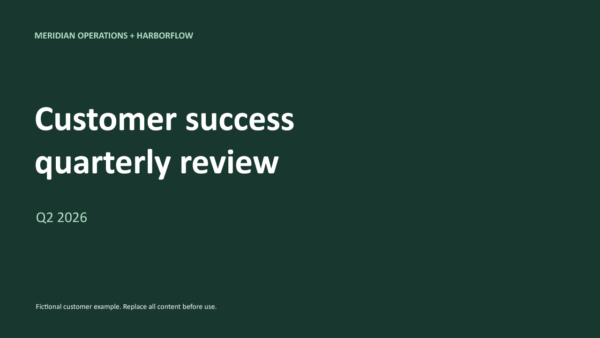
- Customer quarterly review cover.
- Meeting purpose and discussion agenda.
- Account context and measurement boundaries.
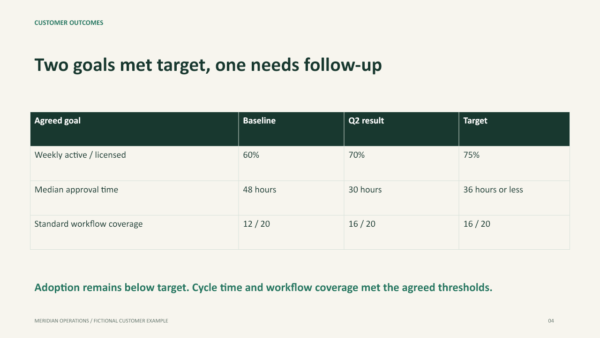
- Customer-agreed goals against results.
- Weekly active user trend.
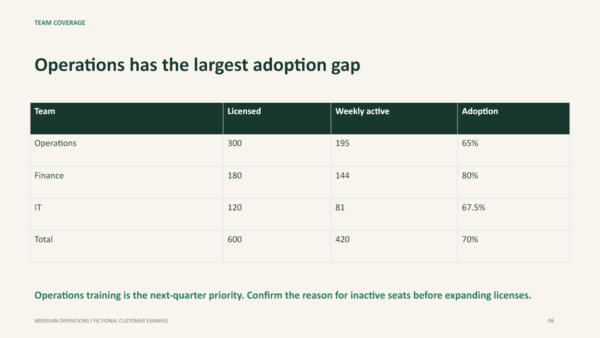
- Team adoption and weighted totals.
- Approval cycle time and sample limits.
- Value discussion without unsupported ROI claims.
- Support ticket movement and follow-up.
- Workflow rollout and coverage.
- Stakeholder roles and sponsor gaps.
- Unresolved renewal conditions.
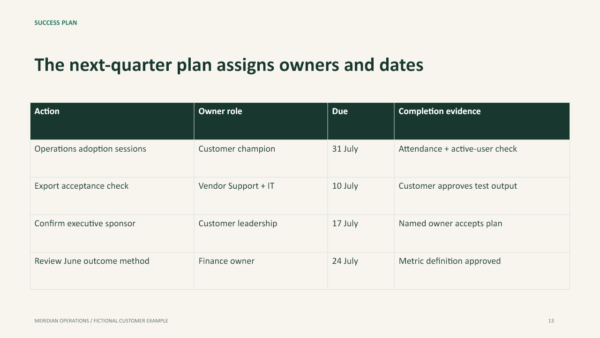
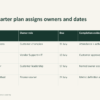
- Success plan with owners and completion evidence.
- Renewal preparation timetable.
- Customer decisions for the meeting.
- Metric definitions and evidence checks.
A connected example you can adapt
The fictional account has 600 licensed seats and 420 weekly active users at June close. The team table adds to the same totals, producing a weighted adoption rate of 70%. Standard workflow coverage moves from 12 to 16 of 20 processes. Support tickets reconcile from eight opening tickets plus 40 new tickets minus 43 resolved tickets to five closing tickets.
The approval-time example compares a 48-hour baseline with a 30-hour June median. It explains why elapsed cycle time cannot automatically become labor savings or financial ROI. Renewal readiness uses owned conditions and review dates rather than an unvalidated churn prediction. All names, figures and events are fictional. Replace every example before presenting customer performance.
How to edit your customer success QBR
- Extract the ZIP, read the example and save copies of the working presentation and Excel workbook.
- Replace the customer, vendor, quarter and contract facts.
- Agree outcomes and metric definitions with the customer. Populate verified workbook inputs and record source locations, owners and extraction dates.
- Transfer checked figures manually. Use Edit Data to replace every chart placeholder, category, unit and axis bound, then update tables and commentary separately.
- Record actions or pending decisions in Success plan. Enter a manual review date to flag overdue items, and record acceptance evidence and a valid completion date before marking an item complete.
- Read the notes, verify source periods and request customer review before circulation.
The deck uses an emerald and warm-white visual system with Aptos typography. Text, charts and tables remain editable. Microsoft PowerPoint and Excel are the intended editors. Other apps may require layout adjustments. The workbook has fixed ranges for ten team rows and 20 action rows, with missing/invalid-input flags and arithmetic checks. Source accuracy, cohorts and date completeness still need review. No macro, CRM connection, reminders or automated health score is included.
Work through the customer QBR example
Read the customer success QBR example and preparation checklist to see why 420 active users out of 600 seats means 70% adoption, how the support balance reconciles, and what an owned follow-up action needs.
Who this template is designed for
Customer success managers, SaaS account managers and service teams preparing customer-facing quarterly business reviews. It works best when your team has reliable usage, support and contract records and wants a repeatable meeting structure. It is a customer account review, not a fundraising deck or financial board report.
Frequently asked questions
What is a customer success QBR?
It is a quarterly review with a customer covering agreed outcomes, evidence and future priorities. This template gives you an editable presentation framework, not a guarantee of retention or expansion.
Are the charts screenshots?
No. Each deck has two native editable charts and nine native tables. The working charts start with labeled zero placeholders, not actual customer results.
Does it include a blank deck?
Yes. Version 1.1 includes a separate matching 16-slide working template with bracketed fields and labeled placeholder charts. The complete fictional example is included separately.
How does the follow-up tracker work?
Set a manual review date and record each action or pending decision with its owner, due date and state. The tracker flags overdue items, invalid dates and incomplete records. Completed rows need acceptance evidence and a completion date on or before the review date. It does not send reminders or record commercial approval.
Can it calculate ROI or predict renewal?
No. The example separates observed metrics from unverified benefits. You must validate any ROI methodology and commercial assumptions with the customer.
Can I use it with clients?
The single-business license permits your business use and customized client presentations, but not redistribution or resale of the source template. Read our License.
How do I access the package?
The product provides a ZIP download through your order. See Download Help for guidance.

Reviews
There are no reviews yet.