The client paid part of the invoice. What is still due?
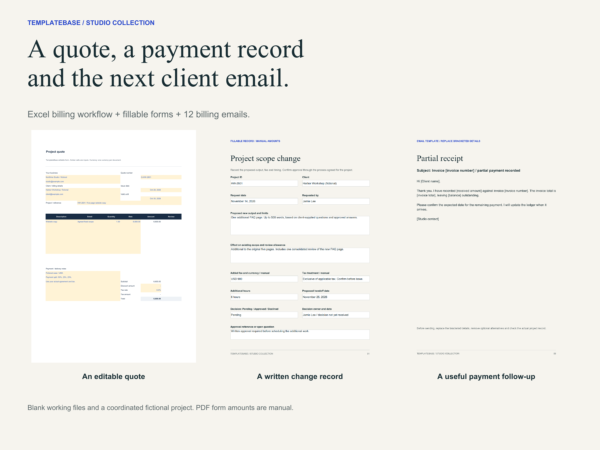
This kit helps you keep the issued amount, cash received and outstanding balance clear. Prepare a quote, save each issued document, record payments against the correct invoice, then adapt the matching email for the next conversation.
Read actual pages before choosing
Open the seven-page studio preview (PDF). It shows selected actual pages across the three separate kits. This is a read-only preview; editable working files are supplied in the paid ZIP.
What is inside
- Blank and studio-example XLSX workbooks, each with six sheets: Receivables, Invoices, Payments, Quote, Invoice and Start here
- Capacity for 100 invoices and 200 payment receipts, including partial payments and an aging chart
- Quote and invoice PDF forms, each with 43 fillable fields and eight item rows
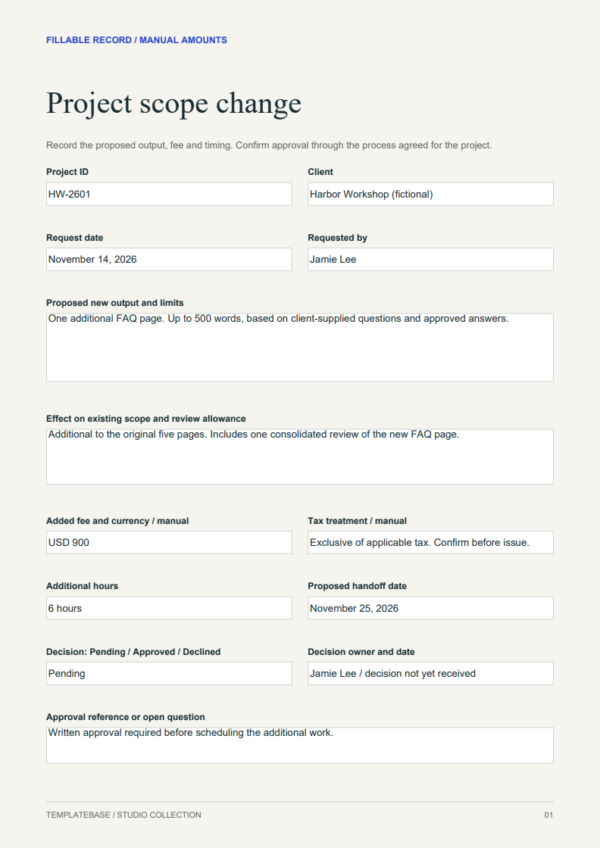
- A 13-field scope-change form and completed pending-change example
- Twelve complete billing emails in copyable TXT and PDF formats
- A three-page setup guide and six-page fictional project walkthrough
- File map, version notes and commercial-use license
A complete project to learn from
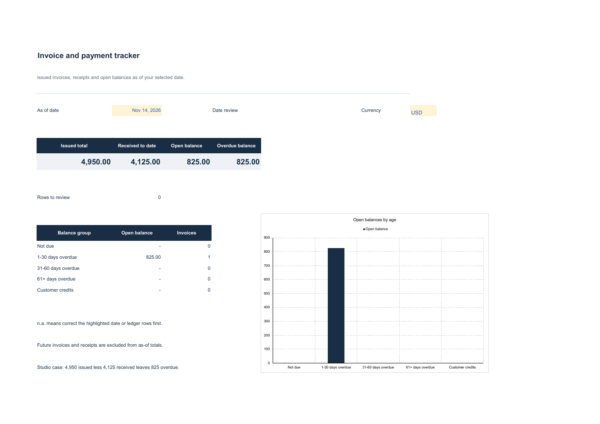
The fictional Northline Studio project has a USD 6,600 fee. Two invoices total USD 4,950, receipts total USD 4,125 and USD 825 remains overdue at November 14. The unissued final milestone stays outside overdue invoices. Follow the example to see how a partial payment changes the next client message.
A new request gets a written decision
The FAQ-page example records the proposed output, USD 900 fee and revised handoff date. Its status remains Pending. The fee does not become approved project revenue merely because the client requested it.
Use it with your own workflow
The Excel quote and invoice forms calculate amounts but do not post ledger rows. You enter issued totals and actual receipts manually. The PDF forms require a reader with form support and do not calculate. The emails are reusable copy, not automated sending.
Use Microsoft Excel on desktop. One currency per workbook. Refunds, credit notes, tax filing, bank connections and payment collection are outside this kit. Date and input review help expose missing or invalid records.
How this fits the collection
This is the billing module. The client communication kit and project profit planner are separate products. The shared walkthrough explains the full project across the collection. This purchase includes only the files listed above.
Choose another module only if you need its workflow: Studio Client Proposal, Welcome and Handoff Kit, or Studio Project Profit and Cash Planner. Compare the three studio kits.
Delivery and studio use
Digital download. After payment, use the download in your order to access the ZIP on Google Drive. Open START-HERE.pdf first. All content is in English. Software subscriptions are separate.
One purchase covers one brand or organization. A purchasing studio can use finished documents under its own brand for client work. Editable source access for another client brand requires a separate license. Reselling or publicly sharing the editable templates is prohibited. See LICENSE.txt and the store license.
Access help: Download Help. Support: vividreams915@gmail.com.