
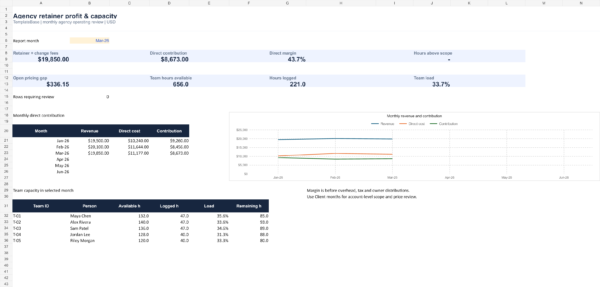

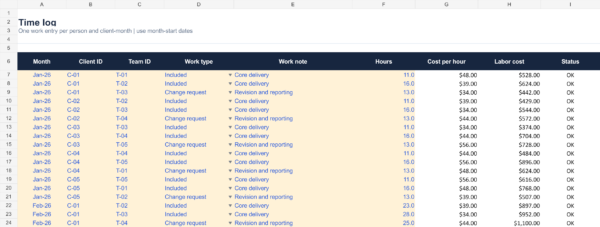
See which retainers earn a healthy margin and where delivery hours exceed scope
The Agency Retainer Profitability & Capacity Planner is an editable Excel workbook for small agencies and studios managing monthly client retainers. It connects each client-month’s fee and included hours to actual team time, burdened hourly cost and direct client expenses. You can review direct contribution, scope overrun, a cost-based minimum fee and team load in one system. It uses manual entry and does not connect to a time tracker or accounting platform.
See a retainer profitability calculation before you buy
Read the worked client-month example to compare fees, labor cost, scope overruns and a cost-based pricing gap. It uses fictional data from the example workbook and explains why excess hours do not automatically mean a fee increase.
What the system calculates
- Client-month economics: combine retainer and change-request fees, then subtract logged labor cost and other direct client costs. View direct contribution and direct margin for each account.
- Scope overrun: compare actual logged hours with hours included in the retainer. An overrun is a delivery warning, not automatically extra revenue.
- Pricing gap: set a target direct margin and see the minimum fee implied by actual direct cost. The positive difference from current fees is shown separately.
- Team capacity: compare logged hours by person with editable monthly available hours. Loads above 100% are highlighted.
- Review controls: incomplete client-month inputs, duplicate month-and-client keys, unmatched team IDs and missing cost rates trigger REVIEW instead of a misleading healthy result.
- Monthly trend: choose a report month for revenue, contribution, direct margin, open pricing gap and team load. A native Excel chart tracks the first six months of the year.
Version 1.1 · October 16, 2026: includes stronger date and missing-input checks. Dashboard review counts cover all months; resolve every REVIEW row before using totals. Invalid or empty report periods show unavailable results rather than misleading zeros.
What is included
- An Example Excel workbook with 5 fictional clients, 5 team members, 15 client-months and 45 time entries.
- A matching Blank Excel workbook with live formulas, inputs, validation and status highlighting.
- A three-page PDF quick-start guide with setup steps, worked economics and a monthly review routine.
- README and single-business use license.
The prebuilt ranges cover up to 60 client-months, 300 time entries and 12 team members. Extend formulas and ranges before going beyond these limits. Microsoft Excel is the intended application. Other spreadsheet apps may display formulas, validation or charts differently after import.
How to use it
- Enter each team member’s unique ID, burdened hourly cost and realistic monthly delivery capacity in Team.
- Add one row for each client and month in Client months, including retainer, change fees, included hours, direct expenses and target margin.
- Record delivery hours in Time log using the same month-start date without a time component, client ID and a valid team ID.
- Resolve REVIEW rows, then inspect account-level LOSS, SCOPE OVER and PRICE GAP signals. Select the month on Dashboard for the team view.
Amber cells with blue text are editable. Type 0 for a genuine zero fee or expense instead of leaving a required input empty.
Who it is for
Agency owners, account leads and operations managers running recurring design, marketing, content, development or consulting retainers. It is especially useful when you need to explain whether a fixed monthly fee still covers the actual delivery effort.
The workbook cannot detect time that was never entered. Reconcile source time records before relying on margins. The chart displays January–June 2026; other report months do not automatically extend that chart. Team capacity is a fixed monthly input and does not retain historical staffing or leave changes.
Important boundaries
Direct contribution is not accounting net income. This workbook excludes agency overhead, tax, collections, refunds and owner distributions. The fee floor is a cost-based planning calculation, not a guaranteed selling price or a substitute for professional accounting advice. Available team hours are a fixed monthly input, not a live calendar reservation.
Frequently asked questions
Can I change the rates and included hours?
Yes. All inputs and formulas are editable. Update team costs and each client-month’s fee and scope as your agreements change.
Does it support change requests?
Yes. Enter the actual change-request fee in Client months and classify related time entries in Time log. The workbook does not generate invoices.
What if the same client appears twice in one month?
The duplicate key is marked REVIEW. Keep one client-month row and record multiple work entries in Time log.
How do I receive the files?
After successful checkout, the ZIP download link is available through your order and WooCommerce order email. See Download Help for access guidance.

Reviews
There are no reviews yet.